


Introduction
Listing school events is the easy part. Making sure families have clear access to all details and can easily participate is far more challenging.
The real challenge is keeping everyone in the loop—how families find details, get involved, and know exactly what to expect. A basic calendar entry can leave families searching for more info or scrambling to sign up through other channels.
Back-to-school nights, curriculum evenings, student field trips, seasonal celebrations, book fairs, and PTO fundraisers pack school calendars. But here’s the issue: event details often get scattered—one place lists the event, another handles volunteers, and reminders pop up separately, sometimes just on social media. It turns a simple event into a puzzle for families.
This guide spotlights a range of popular tools schools use today—each designed to simplify and make event management more family-friendly.

1. School Website Management Platforms
Most schools already use their website to list events. However, relying solely on the website introduces certain limitations.
There is usually a calendar, and it is often the first place families are told to check. For school-wide events, this can work reasonably well as a reference point, especially when the information is kept up to date.
Classroom and PTO activities are often inconsistently displayed on the school website. They’re shared via email, apps, or separate tools, making it harder for families to see everything.
Websites usually do not offer RSVP, volunteer coordination, or integrated forms directly on event pages. Updates and reminders are managed elsewhere, which can require families to track several tools.
The website serves as a place to list events, but not to fully manage them.

Feature Highlights 💫
- Public event calendar accessible without login
- Basic event listings with date, time, and location
- Integration with school pages and announcements
- Can link to external tools for RSVP, forms, or sign-ups
Cost 🏷️
Typically included as part of a school or district website contract. Additional costs may arise when external tools are needed for RSVP, forms, or volunteer coordination.
Pros ✅
- Public, easy-to-access reference point for school-wide events
- Familiar for families and does not require a login
- Works well for basic event visibility
Cons
- Classroom and PTO events are often missing or inconsistent.
- No built-in RSVP, volunteer coordination, or forms
- Requires additional tools for communication and participation
2. Facebook Events
Some schools and PTO groups use Facebook Events to share upcoming activities. Transitioning from traditional website listings, Facebook offers a different approach for event sharing.
Facebook is familiar to many families, and it works reasonably well for informal events such as fundraisers, social gatherings, or community nights. Families can RSVP, comment, and share the event within their networks.
The challenge is that Facebook is not a school-controlled system. Not all families use Facebook, and event information can be easy to miss or disconnected from official school communication.
Facebook Events can supplement other communication tools, but due to limited school control and variable family use, they are not reliable for managing essential event details or participation.
Feature Highlights 💫
- Event creation with date, time, location, and details
- RSVP tracking (“Going,” “Interested”)
- Comment threads for informal interaction
- Easy sharing across networks
Cost 🏷️
Free to use. Since Facebook operates outside of school systems, additional tools for formal communication and coordination are needed.
Pros ✅
- Familiar platform for many families
- Easy to create and share events
- Supports RSVP, comments, and informal interaction
Cons
- Not all families use or have access to Facebook.
- Not part of official school communication systems
- Event information can be inconsistent or easy to miss
- Privacy concerns with posting student pictures and highlighting private events
3. ParentSquare
ParentSquare is widely used, especially at the district level, and is built around communication. Shifting from social platforms, ParentSquare integrates events into daily school communications.
Schools share event info, send reminders, and collect responses in the same system used for messaging. Events are part of this communication flow.
Participation features such as RSVPs, volunteer sign-ups, and forms are available, but they are typically added to posts rather than structured on a dedicated event page.
Some schools find that ParentSquare works well for delivering information and reminders, but event coordination may lack structure because RSVPs and participation are tied to individual posts rather than a dedicated event hub.
Feature Highlights 💫
- Event posts with RSVP and reminders
- Volunteer sign-ups and supply requests within posts
- Forms and permission slips with digital responses
- Two-way messaging across app, email, and SMS
- Translation support for communication
Cost 🏷️
Typically licensed at the school or district level. Pricing is often based on student enrollment, with additional costs for services such as text messaging.
Pros ✅
- Established communication platform
- Events can be shared broadly across schools and families.
- Includes RSVP, volunteer, and form features within posts
Cons
- Event coordination is tied to posts rather than a dedicated event structure.
- Participation elements are not centered in a single event hub
- Event experience can depend on how posts are organized.
4. Bloomz
Bloomz is commonly used at the classroom level, particularly in elementary settings.
Teachers share updates, photos, and reminders, and events fit naturally into that stream of communication. Families can respond and stay connected in a way that feels familiar.
When multiple classrooms and groups get involved, school-wide event organization on Bloomz can feel less connected.
This approach works well within single classrooms. However, coordinating events that involve multiple classrooms or the entire school can be challenging.
Feature Highlights 💫
- Classroom event sharing and reminders
- Teacher-parent communication and updates
- Photo sharing within classroom groups
- Translation support for both content and interaction
Cost 🏷️
Bloomz offers a mix of free and paid tiers. Some features are available at no cost, while expanded functionality may require subscription plans at the school or classroom level.
Pros ✅
- Easy for teachers to use at the classroom level
- Combines communication and simple event sharing
- Familiar experience for families
Cons
- Less centralized for school-wide event coordination
- Can become fragmented across classrooms
- Limited structure for larger or multi-group events
- Class and group events do not automatically show up in the school’s master calendar but this may be possible with configuration
5. SignUpGenius
SignUpGenius specializes in bringing volunteers together fast.
Schools widely use it to assign time slots and coordinate participation for events such as book fairs or classroom activities. The process is straightforward, and many parents already know how to use it.
While SignUpGenius takes the stress out of volunteer sign-ups, it doesn’t manage the event itself or provide timely updates. That’s why schools often pair it with other tools for a full event experience.
Many schools combine SignUpGenius with other tools to manage events from start to participation.
Feature Highlights 💫
- Volunteer sign-up sheets with time slots
- Automated reminders for participants
- Custom sign-up fields and supply requests
- Payment collection for events and fundraising
Cost 🏷️
Offers free access with optional paid upgrades. Premium features and ad-free experiences are available through subscription plans.
Pros ✅
- Effective for volunteer scheduling
- It’s quick to pick up, and many parents already know the ropes.
- Quick to set up for specific needs
Cons
- Not a school communication platform
- No unified school calendar view
- Event details and updates are outside the system.
- Requires additional tools for full event coordination
6. Membership Toolkit / PTBoard
These platforms are often used by PTO or PTA organizations.
They support events, fundraising, and parent coordination, and they can work well for organizing parent-led activities.
The catch? These platforms usually operate alongside school-wide communications, leaving families to shuffle between PTO/PTA tools and the school’s communications.
Families may need to switch between systems to stay informed and participate.
Feature Highlights 💫
- Event creation with RSVP and volunteer coordination
- Fundraising and payment collection tools
- Parent directories and membership management
- Email communication for parent groups
Cost 🏷️
Typically subscription-based, often paid by PTO/PTA organizations. Costs may vary depending on features such as fundraising, payments, and membership management.
Pros ✅
- Strong for PTO/PTA-led coordination and fundraising
- Supports parent group organization and events
- Effective for managing parent-led activities
Cons
- Separate from school communication systems
- Families may need to track multiple platforms.
- Limited connection to classroom or school-wide communication
7. School Signals
School Signals believes events are more than calendar listings—they’re school moments that deserve their own spotlight.
Each event receives its own detail page, serving as a central hub for everything related to that event—RSVPs, volunteer sign-ups, contextual forms, and photo galleries all exist in one place. Participation features remain connected to the event, not scattered across different tools.
Events can also be shared in the feed, so families see them alongside everyday updates. Visibility tends to drop when events sit on their own, so this connection matters.
This way, families aren’t left searching across platforms. RSVP, updates, and sign-ups all live with the event itself, making everything simpler and more inviting.
Families don’t just notice an event—they join, contribute, and stay in the loop until it’s done, all without bouncing between systems.
Feature Highlights 💫
- Dedicated event pages with full event details
- Integrated RSVP, volunteer sign-ups, and contextual forms
- Photo galleries connected to each event
- Events shared in the feed for visibility and notification sending
- Custom Spanish language option (not AI-translated): user interfaces include Spanish RSVP responses
- Event planning enabled with the private committees feature
Cost 🏷️
Typically licensed at the school or district level, with pricing aligned to school size and communication needs. Features are bundled to reduce reliance on multiple external tools.
Pros ✅
- Event pages bring RSVPs, volunteers, forms, and galleries together in one place.
- Events can be surfaced in the feed for visibility.
- Reduces the need for multiple tools and links
- Supports both communication and participation together
Cons
- For full benefits, requires commitment to use consistently
- May involve a shift from existing multi-tool workflows
Event Coordination and Family Engagement 💌
Most schools already have the pieces to manage and showcase events. Schools and PTA/PTO groups navigate the digital landscape and find a way to share events, organize volunteers, and communicate with families. The tricky part is that the pieces don’t always connect easily.
The misaligned or fragmented pieces may impact event attendance and family engagement.
School engagement assessment teams may pinpoint questions that inquire specifically why families choose to attend events, and the reasons why events are missed. The core questions are:
1. What most often prevents you from attending school events? (Select one)
- I did not hear about the event
- The timing didn’t work
- It didn’t feel relevant to my family
- Transportation or other logistics
2. What most influences your decision to attend events? (Select one)
- My child is involved
- I want to support the school
- I was personally invited
- Attendance is expected by the school
A thoughtful school communication planning includes aligning ways how stakeholders communicate and announce events, making sure the efforts are consistent, and families know how to access school calendars, volunteer in events, share pictures, ask questions, and spread the word.
Choosing the Best School Events App 📝
The best school events app or management software depends on the school’s needs and the identified feedback for engagement improvement. For events that need to reach stakeholders and fundraising beyond the immediate community, social media plays a significant role. For school and classroom events that focus on supporting student learning and academics, a school communication platform is optimal. For reaching multilingual families, schools will need to consider translation tools. And for events organized by parent volunteers, the school needs strong tools for planning, communication, and volunteer sign-ups.
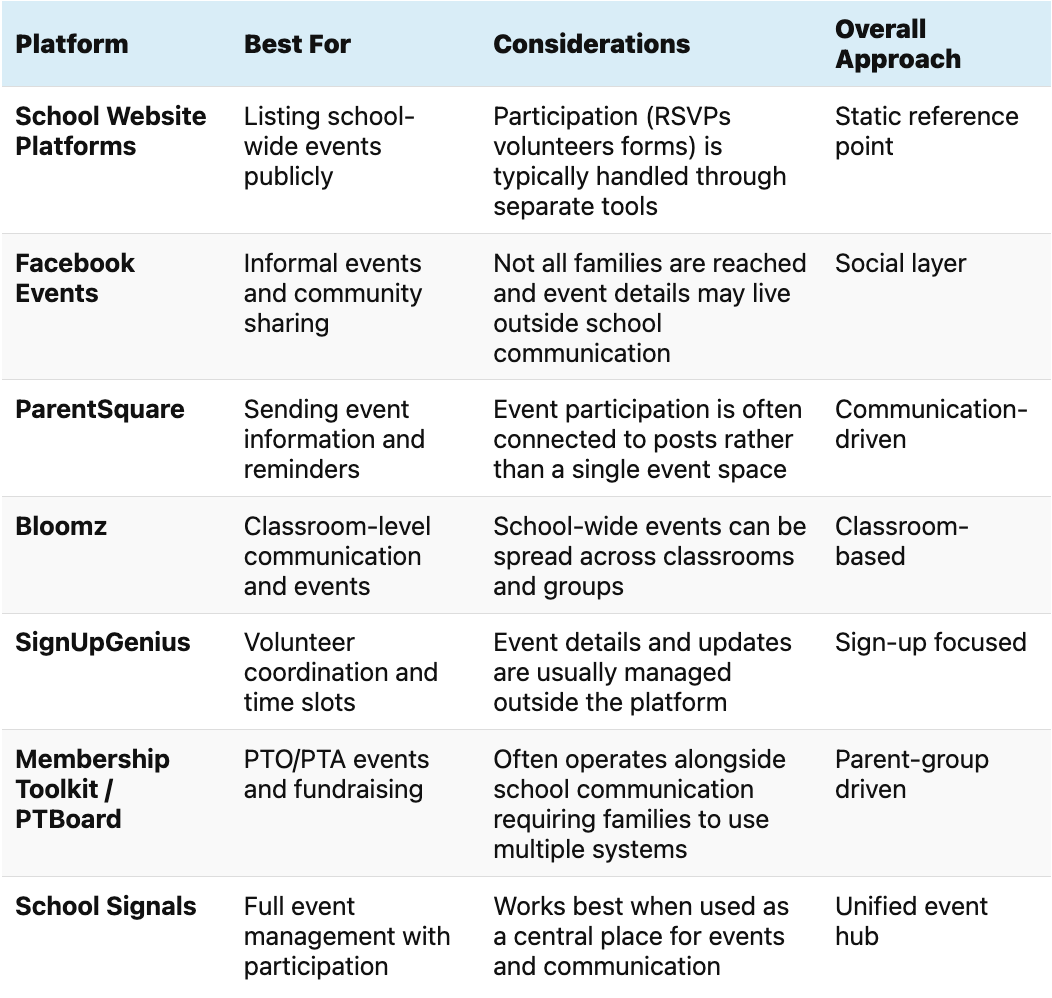
K12 School Events Software Summary 📋

- How To Increase Parent Attendance in PTA Meetings - October 5, 2026
- Getting School Communication Right During the First Weeks - September 27, 2026
- Building Trust with Inclusive School Communication - September 13, 2026