School Feed

School News
and Updates

School Feed brings district announcements, school updates, and classroom communication into one place.

School Signals Product Discovery
School Signals School Feed displaying school news, announcements, and parent communication

Two-Way Communication with Eeasy Oversight

You want to unlock two-way communication while maintaining oversight and quick response times. Welcome to School Signals. The School Feed in School Signals offers flexible settings so you can configure communication the way it works for your school. With easy moderation of posts and comments, you give families a voice while reducing repetitive questions.

School Signals

From inbox delivery
to measuring acknowledgement.

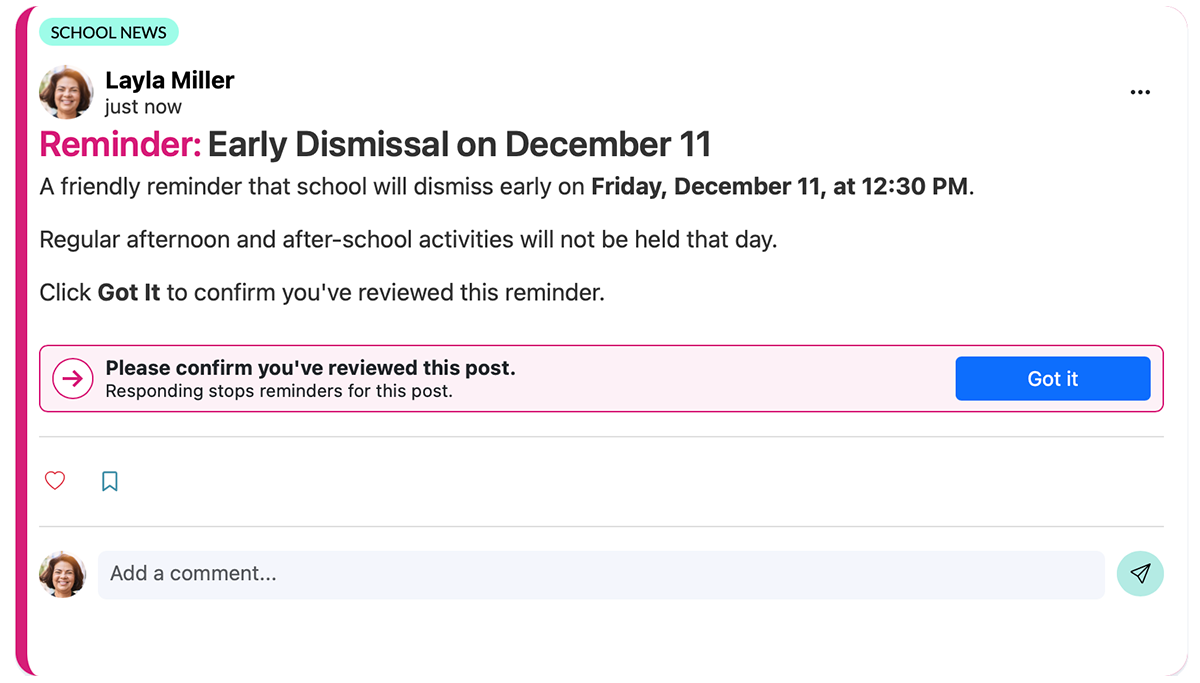
Introducing Attention & Action. Highlight important school announcements, let families confirm they've reviewed them, and automatically follow up with those who haven't.

School Signals Attention and Action feature showing highlighted school reminders and Got It acknowledgment buttons

Critical Alerts Notify Everyone

Critical Alerts keep your district or school informed about school closures, severe weather, or safety concerns. Enable two-way communication for your community's questions.

Learn more

Translated Communication Connects

School news and classroom updates are automatically delivered to families in their home languages. Spanish speakers can also switch the user interface to Spanish.

Learn more

Multiple Ways to Get Attention

Use text and voice messages to notify families about important school news. Spotlight a post and automate reminders until parents confirm they have reviewed it.

Learn more

School Feed Communication FAQ

Each school and community organization has its own culture and traditions that set what type of communication is suitable for the School Feed.

Two-way communication lets parents and community members add supportive comments and reactions to posts and ask questions. Two-way communication is safe with content moderation. Admins can approve posts and comments and choose to keep them private. The AI guardrails in the background detect any inappropriate language and stop it.

School Feed can help create a more open school culture while improving efficiency. Families benefit from seeing that others share similar experiences and questions, while teachers and staff spend less time answering the same questions individually.

School Signals recognizes that each school has its own communication needs and goals. The School Feed’s communication settings let you configure the feed to meet those needs. You can choose who can make posts (admin, teachers, students), and which channels these users can make posts. You can additionally choose if student- and parent-made posts and comments need to be moderated before they go live.

As an example, you might set your school with the following rules:
Only school leaders and admins can make school-wide news posts and announcements; teachers can make grade-level and classroom-level updates; parents can comment on all posts but with an approval process; parents can make posts to parent groups without pre-approval. Parent admins can be granted special rights.

Typically, the head of school, school administrators, and the school’s communications and marketing officers create school-wide news and announcement posts. District leaders share news that can be posted to several schools. Teachers typically make posts to grade levels and classrooms. Coaches make posts and add communication to after-school clubs. Parents’ communication rights depend highly on the school’s individual preferences.

Yes. You can manage non-urgent updates on your own schedule while optimizing delivery time for parents, teachers, and staff. With scheduled communication, you can take your time crafting your messaging and ensure it goes out at an optimal time. Timely, proactive updates on policies and crucial dates preempt confusion and address issues before they escalate.

School Signals uses multi-channel notifications to notify the community of new communications. Standard posts are notified by email and app push. Priority and Critical posts are additionally notified by text message and/or voice message. The system does not restrict text and voice notifications. User consent is required for notifications unless the message is a Critical Alert.

Parents find communication by following the notifications delivered according to their preferences and by visiting the communication feed. The platform is organized by audiences/groups so that parents can locate information easily. For instance, Classroom communication and after-school communication reside in their own designated hubs. Parents can also save and search communication.

If by bulletin board you mean one-way, announcement-style school communication with restricted comments and questions, then yes, that configuration is supported.

You want to get your messages delivered. Each School Feed post includes a delivery report that shows all users who received the communication by email, text or voice message. The report additionally shows all users who confirmed by clicking “Got It” that they reviewed the post in more detail.

School Signals provides AI tools for

  • language translation,
  • content creation, and
  • content monitoring.

School Feed posts are auto-translated with AI Translate for parents who do not speak English as their first language. The posts are automatically translated in parents’ news & updates feeds based on the parent’s language set in their My Account. Voice messages are sent in parents’ language.

The AI Assist provides writing help to craft school and classroom feed posts. We include a modern AI post-generation tool in the Add Post interface that writes a post from a prompt. You can also choose a tone of voice. The system does not flag the post as AI-generated, and you can edit any AI-generated text. For transparency, let your school community know when AI was used.

Additionally, AI is utilized to monitor the School Feed content to filter out any concerning posts that may need manual review. It is the school’s choice to use the AI Monitor tool; School Admin has access to the feed settings to turn the AI Monitor on or off, and to adjust its detection scale.

Bring School Communication and Family Engagement Together

Request a Demo